
Ko ta maatau kaupapa i Ikalor e kore e mutu ki te tuku kaata hototahi kounga. Ka ngana ano matou ki te whakarato otinga ki nga raru o te taarua.
Ko te aratohu o tenei ra e arotahi ana ki nga rautaki ki te whakatika i a Brother Printer i roto i te ahua hapa. Ka whakaatuhia e matou nga take noa me nga otinga mahi.
Me ruku tika ki roto:
Nga take noa o nga Hapa o te Kairereta a teina
- Ko nga taura USB kaore i te hono tika
- Nga hapa korero i waenga i te rorohiko me te kaituhi
- He atekōkiri pūreretā hē, tawhito kē rānei
- Hononga ipurangi puhoi
- Te whakaeke huaketo, malware ranei
Nga huarahi whakatika i te Brother Printer i te Hapa
1. ;Eliminate All the Basics Causes ;
Ko etahi o nga mea matua kei te noho hapa to taarere. I mua i to taenga ki nga otinga uaua, he pai ki te whakakore i nga mea e whai ake nei:
Hononga pūreretā ki te rorohiko: Ko nga taura wetewete te tino take o nga hapa o te kaituhi. Whakapumautia kei te mahi nga taura me te kiki.
Me whakarite kia mahi to pouara mena kei te ta koe ki te whatunga. Rapua te paewhiri mana ka paato ki te whakatuwhera i nga kaituhi me nga taputapu. Ka taea e koe te tirotiro mena kei te raarangi to kaituhi ki reira.
Tirohia to waituhi, taumata toner ranei. Ko nga hapa o te kaituhi na nga take ngawari penei i te waituhi iti, te toner ranei. He tupono kaore i te tika te whakauru i nga kaata. Tirohia o kariri ki te whakakore i tenei take ka taea.
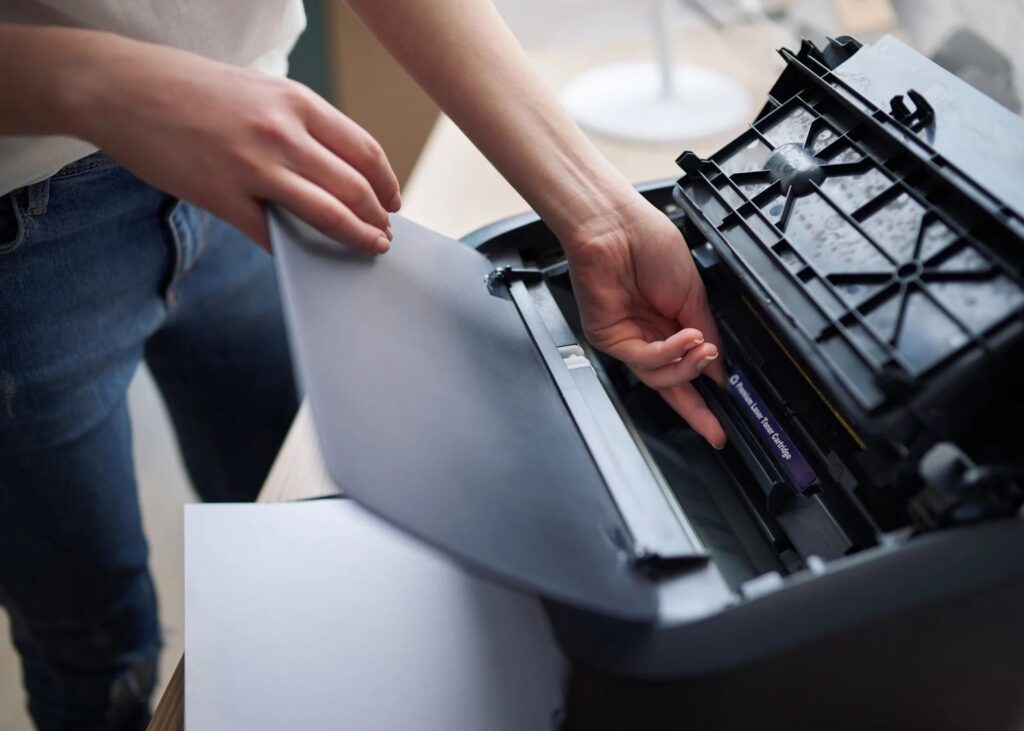
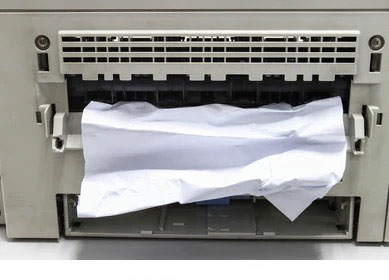
Tirohia mēnā he tāmi pepa: He toenga pepa kei roto i to pūreretā? Tango ata me te whakarite kia kore he mongamonga e toe ana.
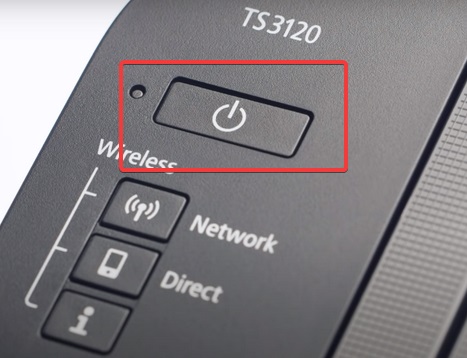
Tīmataria anō ō taputapu. Whakawetohia to rorohiko me to rorohiko mo te rima meneti, ka timata ano. Ma te tiimata ano ka whakariterite i nga take o roto o te taputapu ka tiimata te mahi tika. I raru pea to pūreretā i te wa e whakaara ana, me te whakaara ano ka whakatau. ; ;
Kua whakatauhia e koe te take inaianei? He iti noa te raruraru ki te kore te whakatikatika i aua kaupapa i awhina. Kia tae ki te kaupapa o te kaupapa.
2. ;Me whakarite kei te ipurangi te Kaireretā
Kei te hapa pea to pūreretā na te mea kei te tuimotu. Ma te whakahoki mai i runga ipurangi me whakatika te raru. Whakaūhia te mana o te ata pūreretā ki te paetaumahi o tō rorohiko. Ko tetahi atu, Ka taea e koe te ngana ki te ta i tetahi tuhinga me te tirotiro i te waahanga o nga taonga taputapu. Kei te tuimotu te pūreretā mo etahi take, penei i te iti o te hononga ipurangi. Ka taea hoki e nga whakahōu aunoa te taraiwa kia tuimotu to pūreretā.
Kei te whakaaro koe me pehea te whakatika?
- Uru ki te Paewhiri Mana i runga i to rorohiko
- Haere ki nga kaituhi me nga taputapu
- Pāwhiri-matau i runga i te ata Teina ka kowhiria hei kaituhi taunoa.
- Kia oti te whakarite, pawhiri-matau ano ka tirohia he aha te mea e ta ana e to pūreretā
Ka whakatuwherahia he ripa pūreretā
- Wetetaki i nga whiringa mo te Whakamahi i te Pūreretā Tuimotu me te Whakaorangia te Tā
- Na ka whakaara ano i to rorohiko
Kei te hapa tonu to pūreretā? Haere ki te otinga tuatoru
3. ;Tīmataria anō te Ratonga Pūpōkai Tā
Ko te kaipōkai pūreretā he whakarite i ngā mahi tā i waenga i tō rorohiko me tō pūreretā. Ka taumaha pea te Spooler ina tukuna e koe he raupapa mahi ta. I te wa e pehia ana, e kore te Spooler e tuku i nga konae ki te kaituhi. He maha nga wa ka puta he hapa ta tenei.
Anei nga huarahi hei whakatika:
- I tenei wa, pehia nga taviri Windows me R. Ka whakatuwherahia he pouaka korero hei whakaae ki nga tono
- Patohia nga reta "CMD", ka whakatuwhera i te whakahau whakahau
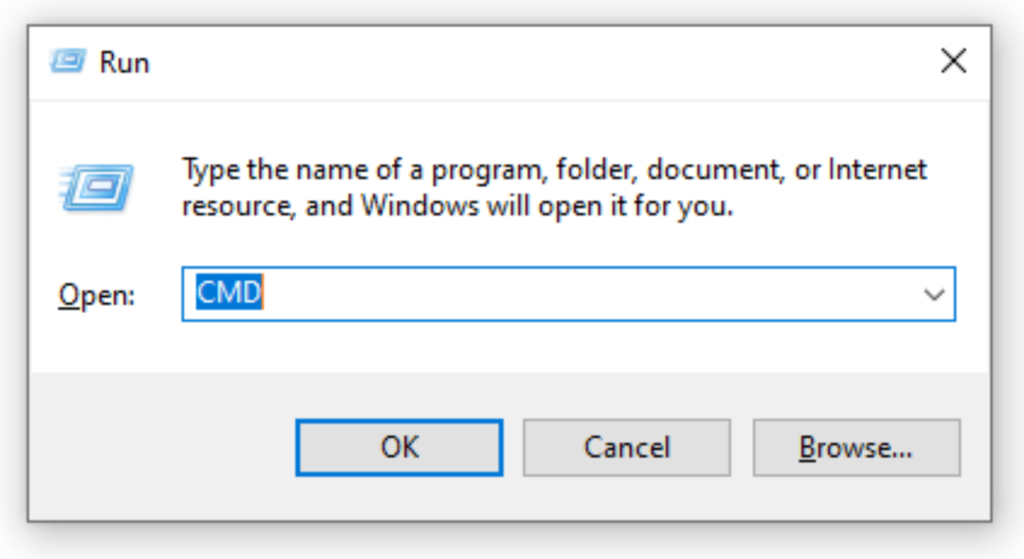
- Pāwhiri-matau ka kowhiria "Run as Administrator" ka paato "Ae" ki te whakau i to tono
- I runga i te Tohuaki Whakahau, Patohia te whakahau "kupenga mutu spooler" ka pehi i te matua tomo
- Ka kite koe i te panui kua mutu pai te Spooler
- Na ka patohia te "puipui timata kupenga", ka pehi ano i te Enter
- Ka kite koe i te karere kua pai te tiimata o te Spooler
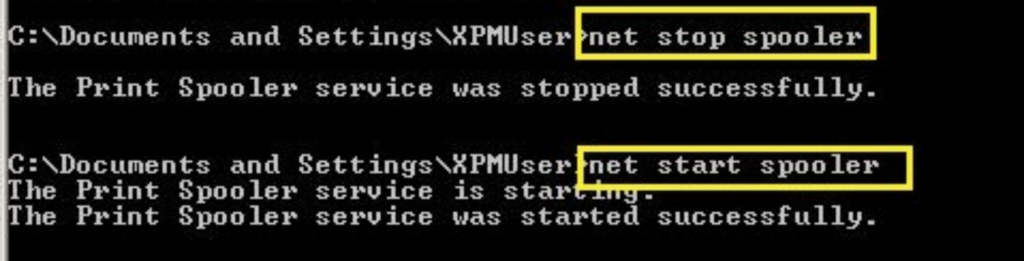
- Tīmataria anō tō pūreretā ka ngana ki te tā
Kei te mahi tika to pūreretā inaianei? Ki te kore, katahi ka haere ki te otinga e whai ake nei
4. ;Ūkuia Ngā Mahi Tā Tārewa Katoa i te Spooler
Ka taea hoki te whakatika i nga hapa o te Spooler ma te whakakore i nga mahi ta katoa.
Ka taea tenei ma te whakauru-a-ringa ki te Spooler, ma te panui ranei i te ata perehi i runga i te paetaumahi
Kia tirotirohia enei whiringa:
- Pēhia ngā kī Windows me R i te wā kotahi.
- Patohia te "C:\Windows\System32\Spool\Printers” on the dialogue box
- Kimihia nga konae kei runga i te Spooler ka mukua
Na ka whakaara ano i te Spooler ma te whai i enei tohutohu:
- Whakatuwheratia te pouaka Run (Matapihi + R kī) ka patohia nga whakahau "Services.msc"
- Pēhia te kī tāuru ka rapua te Spooler i runga i ngā ratonga kua whakarārangitia
- Pāwhiri-matau i te Spooler ka kōwhiri ki te tīmata anō
- Na ka haere ki mua ka whakaara ano i to rorohiko me to kaituhi
Haere ki te otinga e whai ake nei mena ka kitea tonu e koe nga hapa.
5. ;Whakahohehia te Rapu PnP
Ma te whakahohe i te rapunga PnP, Mono me te Purei ranei ka taea te whakatika i nga hapa. I mua i to haere, me timata ano koe i to pūreretā.
Anei nga kaupae ki te whakahohe:
- Kimihia te Kaiwhakahaere Pūrere. Ka taea e koe te rapu me te panui ki te whakatuwhera
- Kia tuwhera, pawhiria te ripa tirohanga hei whakawhanui i te rarangi whakaatu
- Locate the COM &; Nga tauranga LPT me te whakawhānui i te rarangi o nga whiringa
- Rapua te Tauranga Pūreretā ECP (LPT1) ka pato-matau ki te whakatuwhera i nga taonga
- Whakatuwheratia nga Tautuhinga Tauranga
- Tīpakohia te Whakamahia tetahi haukoti kua tautapa ki te tauranga
- Na ka titiro mo te kōwhiringa rapu mono-a-takaro ka paato kia taea ai
- Na ka paato Ok
- Tīmataria anō tō pūreretā me tō rorohiko ka taki mēnā kei te hē tonu te pūreretā
Kei te noho hapa tonu te pūreretā? Kaati, haere tonu me te whakahōu i ō atekōkiri pūreretā
6. ;Whakahoutia nga Atekōkiri Pūreretā teina
Kei te whakahōu i te taputapu pūreretā ka whakatika i nga pepeke ka pa ki to pūreretā. Ka taea e koe te whiriwhiri i nga whakahou aunoa, te whakahou ranei i a raatau.
Anei me pehea e taea ai e koe te mahi i nga whakahoutanga:
- Tūhonohia tō pūreretā ki te ipurangi ka tūwhera i tō pūreretā
- Haere ki te whaarangi tautoko a te tuakana ka haere ki te whaarangi tango
- Rapua te rapu ma te waahanga ka whiriwhiri i te atekōkiri mo to waitohu pūreretā motuhake
- Kōwhirihia te taraiwa e rite ana ki to punaha whakahaere. Tuatahi, tirohia mehemea kei te whakamahi koe i te 32-bit, 64-bit ranei.
- Pāwhiri ki te tiki, me te whakaae ki nga tikanga me nga tikanga mena ka akiakihia
- Whiriwhiria te waahi ka penapenahia to tango ki roto i to miihini ka haere tonu ki te tango
- Pāwhiri ki te tāuta, me te whai i nga kaupae ka akiakihia. Ka awhina i te hono atu i to kaituhi ki te rorohiko i te wa e whakauru ana nga taraiwa.
- Tīmataria anō tō pūreretā ka ngana ki te tā
Kei te anga tonu koe ki te ahua hapa ohorere? Haere tonu ka tango i to pūreretā i runga i te rorohiko
7. ;Wetetāuta ka tāuta anō i tō Pūmanawa Pūreretā ki tō Rorohiko
Ka awhina ano pea te tango me te whakauru ano i to rorohiko i runga i to miihini. Koinei te otinga whakamutunga i roto i tenei aratohu.
A pee i nga kaupae i raro nei:
- Haere ki te paewhiri mana ka rapu mo nga kaituhi me nga matawai
- Kōwhirihia te ata Teina, ka paato ki te tango i te taputapu
- Patohia te "Ae" ka ue'i ki te whakaū i te tangohanga o te taputapu
- Kātahi ka tāuta anō i tō pūreretā
Anei me pehea:
- Rapua te waahanga rapu ka patohia "printers,” ka pato tomo
- Patohia te tohu "+" hei taapiri i o kairereta me o matawai
- Kimihia te Brother Printer ka paato ki te taapiri
I rahua te taapiri i te kaituhi? Paatohia te waahanga e kii ana karekau to kaituhi e puta ki te rarangi
- Na ka whiriwhiri ki te taapiri ma te whatunga, Nihokikorangi ranei ka whakauru
- Tīmataria anō tō pūreretā me tō rorohiko ina oti te tāutanga
Kei te Hapa tonu?
Kei te raru pea to kaireretā ki te mea kei te hapa tonu. Ka hiahia pea koe ki te waea atu ki tetahi kaitoi o te rohe ki te aromatawai me te whakatika i te take.
Kua pau i a koe nga kaata pereta a te tuakana? He aha koe e kore ai e tono mai i a maatau roopu e whai ake nei ka pai ki te utu tika- wheketere? Korero ki a matou ina rite.
26 Nga whakautu
Ia wiki i haere ahau ki te kite i tenei wharangi ipurangi, mo te take tera
e hiahia ana ahau ki te ngahau, i te mea ko tenei papanga he tino pai nga mea rorirori ano hoki.
He maha nga korero kua panuihia e au mo te hunga e aroha ana ki te blogger engari ko tenei panui
he tino pai te tuhi, pupuritia
ki runga.
He pai rawa tenei hoahoa! Ka tino mohio koe ki te pupuri
he kaipānui harikoa. I waenganui i to mohio me o ataata,
I tata oho ahau ki te timata i taku ake blog (pai, almost…;HaHa!)
He mahi whakamiharo. I tino aroha ahau ki o korero, a nui atu i tera, pehea koe
i whakaatu. Tino hauhautanga!
Ia wiki i haere ahau ki tenei paetukutuku, mo te take e hiahia ana ahau ki te ngahau, na te mea ko tenei wharangi paetukutuku he tino pai nga korero rorirori.
Kia ora, Ka takiuru ahau ki to bpog i nga wa katoa. Ko to ahua whakakatakata
whakamataku, kia mau tonu!
Genuinely no matter if someone doesn’;t mohio ka ona ake ki
etahi atu kaimakitaki ka awhina ratou, na konei ka puta.
you’;he tino kaiwhakahaere tukutuku tika. Ko te tere o te utaina o te paetukutuku
whakamiharo. It kind of feels that you’;kei te mahi ano koe i tetahi tinihanga motuhake.
Ano hoki, He mahi rangatira nga korero. kua mahia e koe
he mahi whakamiharo mo tenei take!
It’;He mea whakamiharo ki te toro ki tenei paetukutuku me te panui i nga tirohanga
o nga hoa katoa mo te kaupapa o tenei panui, i ahau
he ngakau nui ano ahau ki te mohio.
Tena koutou mai Ohio! I’;m te hoha ki te tangi i te mahi ka whakatau ahau
tirohia to paetukutuku i runga i taku iphone i te wa okiokinga tina.
I really like the information you present here and can’;kaua e tatari ki te titiro ina hoki ahau ki te kainga.
I’;I miharo ahau ki te tere o te utaina o to rangitaki ki runga i taku waea pūkoro..
I’;m kore noa te whakamahi WIFI, 3G noa.. Heoi ano, blog pai!
I do believe all the ideas you’;kua whakaekea
ki to pou. He tino whakapono ratou
a ka tino mahi. Heoi ano, he tere rawa nga pou mo
timata. Tena koa kia roa ake te waa mai i nga wa e whai ake nei?
Mauruuru koe mo te panui.
I’;e pai ana ki te mihi ki a koe mo o kaha
kua tuhia tenei paetukutuku. I’;Kei te tumanako ahau ki te tirotiro i nga pou rangitaki teitei-nui mai i a koe a muri ake nei.
Ina hoki, na o pukenga tuhituhi auaha i whakahihiko ahau
ki te tiki i taku ake, blog whaiaro inaianei 😉
I mua ka taea e au te rapu tohutohu pai mai i o tuhinga tuhinga.
Tena koe. I kitea e au to paetukutuku i te whakamahinga o te msn. He tuhinga tino pai te tuhi.
Ka whakarite ahau ki te tohu tohu ka hoki mai ano ki te panui atu
o korero whai hua. Mauruuru koe mo te panui. I’;ll
tino hoki mai.
He panui pai. I was checking continuously this blog and I’;m faauruhia!
Ko nga korero tino pai rawa atu ko te waahanga whakamutunga 🙂 Ka tiaki ahau
he maha nga korero penei. I rapu ahau i enei korero mo te wa roa.
Nga mihi me te waimarie.
Kia ora, he pai tenei wiki i hangaia mo au, i tenei wa
Kei te panui ahau i tenei tuhinga matauranga nui i konei
i toku whare.
He waahanga pai o te ihirangi. I tutuki noa ahau ki to papaanga me to urunga whakapaipai ki te kii kei te whiwhi au
i pai ki te kaute i o panui rangitaki. Any way I’;Ka ohauru koe mo o whaangai me taku e kii ana ka tika to urunga kia tere tonu.
Tena koe! Ko taku haerenga tuatahi tenei ki to rangitaki! He roopu matou o
tūao me te timata i tetahi kaupapa hou i roto i te hapori i roto i te kohanga kotahi.
I homai e to rangitaki nga korero nui hei mahi maatau. He mahi whakamiharo to mahi!
He rangitaki tino kaha, I pai ahau ki tera wahi. Ka puta he
wahanga 2?
Panui nui. I mua i te tirotiro tonu ahau i tenei
weblog and I’;m whakamihi! Ko nga korero tino awhina ina koa ko te waahanga whakamutunga 🙂
Ka tino manaaki ahau mo aua korero. I rapu ahau mo tenei korero mo te wa roa
wā. Nga mihi me te waimarie.
What’;s up hoa, he pai te tuhi me nga tautohetohe pai i korerohia i konei, Kei te tino koa ahau ki enei.
Anei te pae tino pai mo te hunga e hiahia ana ki te mohio ki tenei
kaupapa. Kei te mohio koe he uaua ki te tautohetohe ki a koe (ehara i tera
Ka hiahia au ki te…HaHa). You certainly put a fresh spin on a topic that’;kua tuhia mo te wa roa.
Mea pai, whakamiharo noa!
Kia ora, Ki taku whakaaro i kite ahau i a koe e toro ana ki taku pae
no reira i tae mai ahau ki konei ki te hoki ki te hiahia?.Kei te ngana ahau ki te kimi
nga mea hei whakapai ake i taku paetukutuku!Ki taku whakaaro he pai ki te whakamahi i etahi o o whakaaro!!
Nga mihi mo tetahi atu panui nui. Ko tetahi atu waahi ka taea e te tangata te tiki i tera momo korero i runga i te ahua tino pai o te tuhi?
He whakaaturanga taku a tera wiki, and I’;m i runga i te rapu mo nga korero penei.
Kia ora, kua mohio noa koe ki to rangitaki na Google,
a ka kitea he tino korero. Ka mataara ahau mo Brussels.
I’;Ka maioha ki te haere tonu koe i tenei wa kei te heke mai. He maha nga tangata ka whai hua mai i to tuhi.
Kia ora!
Mihi , I’;kua rapua e koe nga korero mo tenei
subject for a while and yours is the greatest I’;kua tae mai ki tenei wa.
Engari, he aha mo te rarangi raro? He pai koe mo te tuku?
Nga mihi mo te panui! Hei kaihanga, ka whakahaere tika matou i te tuku. Could you let me know exactly what you’;d rite ki te whakaū? Ka koa ki te whakautu.