
OEM lansează periodic noi versiuni de firmware de imprimantă. Actualizarea firmware-ului imprimantei conține îmbunătățiri ale produsului sau remedieri ale problemelor. Panoul de control al imprimantei poate primi, de asemenea, informații actualizate, în funcție de modelul imprimantei. Compania HP dorește să ne actualizăm în mod regulat firmware-ul și aplicațiile imprimantei. Pentru că ei speră că putem asigura că folosim la maximum imprimanta noastră.
The “;firmware update”; nu este nou pentru noi. Ce este o actualizare a firmware-ului imprimantei? It is the process of downloading the latest updates via the cloud and at the same time upgrading the printer’;firmware-ul consumabilelor interne. Aceasta poate părea o optimizare a imprimantei. Dar de fapt, limitează utilizarea consumabilelor de imprimare compatibile. Pentru că dacă firmware-ul imprimantei a fost actualizat, imprimanta nu a putut recunoaște cipul cartuşului de toner. The printer will show “;cartridge problem.”;
Câte moduri se actualizează firmware-ul imprimantei?
Atunci Samsung este un exemplu. Există șase moduri de actualizare a firmware-ului.
Un program tradițional de actualizare a firmware-ului
Același model de imprimantă, cu timpi diferite de fabrica. Versiunea de firmware a cipului de pe placa de bază va fi, de asemenea, schimbată. Ce putem face într-o astfel de situație? Cipul cartuşului de toner compatibil trebuie să se potrivească cu timpul din fabrică a imprimantei OEM.
Soluție de actualizare a firmware-ului de rețea
Această soluție este de a actualiza versiunea curentă de firmware prin intermediul rețelei. După finalizarea upgrade-ului, va face ca cipurile consumabile compatibile să nu poată executa imprimarea corespunzătoare atunci când această metodă de upgrade a fost introdusă pentru prima dată pe piață. Este relativ nou pentru toată lumea. Și va fi ușor să nu recunoașteți mașina dacă faceți clic accidental pe upgrade.
Soluție de actualizare declanșată în timp
Pentru utilizatorii de imprimantă, întrerupeți conexiunea la rețea pentru a preveni upgrade-ul. OEM-urile vor instala direct un program de upgrade cronometrat în procesul de proiectare a imprimantei. Acesta va declanșa automat butonul de actualizare a firmware-ului imprimantei atunci când utilizatorul repornește imprimanta și apoi face ca cipul compatibil să fie nerecunoscut.
Program de upgrade pentru implantare consumabile
Cele trei situații de mai sus nu pot restricționa utilizarea cipurilor consumabile compatibile. OEM-urile vor folosi o metodă de upgrade mai secretă. OEM-urile vor implanta un program de upgrade în datele cipurilor consumabile originale. Astfel, atunci când utilizatorul final cumpără și folosește cipurile consumabile originale, upgrade-ul va fi declanșat pe imprimantă. Afectează utilizarea ulterioară a cipurilor consumabile compatibile pe imprimantă.
Diferite versiuni regionale ale imprimantei în diferite țări
OEM-urile stabilesc diferite versiuni regionale ale imprimantei în alte țări. Va avea ca rezultat instalarea cipurilor consumabile pentru a se schimba cu diferitele regiuni.
Vând imprimantă cu regiuni mixte
Nu numai atât, dar am constatat, de asemenea, că Samsung vinde imprimantă pentru diferite țări cu regiuni mixte. De exemplu:
| Versiune pentru imprimantă | Regiune | Regiunea Mixta |
| CHN | CHN(EX.HK.TW.Macao | EXP(2018) |
| EURO | EURO | EUR&;EXP(de exemplu, Rusia este pentru EXP nu pentru EUR,dar de fapt există EUR și EXP în Rusia) |
| DOM | DOM | Există DOM în EXP |
| EXP | WW | EXP EUR ACASA |
Ce face Ikalor în fața OEM-urilor?
Cum se rezolvă problema incompatibilității livrărilor între diferite regiuni. Am introdus o versiune regională comutabilă a cipului pentru imprimantele Samsung. Other brands of printers released the “;firmware upgrade”; program din când în când. Cipul nostru are o rezistență solidă la upgrade-uri de firmware. Am continuat să îmbunătățim cipul în ceea ce privește viteza, tehnologie, si calitate. Ne propunem să creăm produse mai competitive pentru clienții noștri.
What to Do about the “;C1-451A”; Eroare?
HP a actualizat noile imprimante HP 150nw livrate în iunie 2022. A dus la nerecunoașterea cipului de înlocuire pe piață. It reports the error “;C1-451A”;.
Am aflat actualizarea firmware-ului imprimantei OEM. Găsim soluția și actualizăm cipul.
;S-a confirmat că cipul actualizat poate fi utilizat în general pe imprimantele HP W2080A actualizate..
| Codul Ikalor | Cod OEM | Pagina de randament | Regiune | Imprimanta nr. |
| W2080A | W1003AC/103 | 1,5K | CHN | HP Color Laser MFP 179fnw HP Color Laser MFP 178nw HP Color Laser 150a HP Color Laser 150w HP Color Laser 150nw |
| W2081A | 1,8K | CHN | HP Color Laser MFP 179fnw HP Color Laser MFP 178nw HP Color Laser 150a HP Color Laser 150w HP Color Laser 150nw | |
| W2082A | 2K | CHN | HP Color Laser MFP 179fnw HP Color Laser MFP 178nw HP Color Laser 150a HP Color Laser 150w HP Color Laser 150nw | |
| W2083A | 2,5K | CHN | HP Color Laser MFP 179fnw HP Color Laser MFP 178nw HP Color Laser 150a HP Color Laser 150w HP Color Laser 150nw | |
| W2080A | 3K | CHN | HP Color Laser MFP 179fnw HP Color Laser MFP 178nw HP Color Laser 150a HP Color Laser 150w HP Color Laser 150nw | |
| W2081A | 4K | CHN | HP Color Laser MFP 179fnw HP Color Laser MFP 178nw HP Color Laser 150a HP Color Laser 150w HP Color Laser 150nw | |
| W2082A | 5K | CHN | HP Color Laser MFP 179fnw HP Color Laser MFP 178nw HP Color Laser 150a HP Color Laser 150w HP Color Laser 150nw | |
| W2083A | 1,5K | CHN | HP Color Laser MFP 179fnw HP Color Laser MFP 178nw HP Color Laser 150a HP Color Laser 150w HP Color Laser 150nw | |
| W1003AC | W1003AC/103A | 1,5K | CHN | HP Laser MFP 131a/133pn HP Laser 103a |
| W1003AC | 1,8K | CHN | HP Laser MFP 131a/133pn HP Laser 103a | |
| W1003AC | 2K | CHN | HP Laser MFP 131a/133pn HP Laser 103a | |
| W1003AC | 2,5K | CHN | HP Laser MFP 131a/133pn HP Laser 103a | |
| W1003AC | 3K | CHN | HP Laser MFP 131a/133pn HP Laser 103a | |
| W1003AC | 4K | CHN | HP Laser MFP 131a/133pn HP Laser 103a | |
| W1003AC | 5K | CHN | HP Laser MFP 131a/133pn HP Laser 103a | |
| W1004AC | 1,5K | ÎN | HP Laser MFP 131a/133pn HP Laser 103a | |
| W1105A | W1105A/105A | 1K | MEX/LA | HP Laser MFP 135A/135W/137FNW HP Laser 107a/107w |
| W1105A | 1,8K | MEX/LA | HP Laser MFP 135A/135W/137FNW HP Laser 107a/107w | |
| W1105A | 2K | MEX/LA | HP Laser MFP 135A/135W/137FNW HP Laser 107a/107w | |
| W1105A | 2,5K | MEX/LA | HP Laser MFP 135A/135W/137FNW HP Laser 107a/107w | |
| W1105A | 3K | MEX/LA | HP Laser MFP 135A/135W/137FNW HP Laser 107a/107w | |
| W1105A | 4K | MEX/LA | HP Laser MFP 135A/135W/137FNW HP Laser 107a/107w | |
| W1105A | 5K | MEX/LA | HP Laser MFP 135A/135W/137FNW HP Laser 107a/107w | |
| W1106A | W1106A/106A | 1K | EMEA | HP Laser MFP 135A/135W/137FNW HP Laser 107a/107w |
| W1106A | 1,8K | EMEA | HP Laser MFP 135A/135W/137FNW HP Laser 107a/107w | |
| W1106A | 2K | EMEA | HP Laser MFP 135A/135W/137FNW HP Laser 107a/107w | |
| W1106A | 2,5K | EMEA | HP Laser MFP 135A/135W/137FNW HP Laser 107a/107w | |
| W1106A | 3K | EMEA | HP Laser MFP 135A/135W/137FNW HP Laser 107a/107w | |
| W1106A | 4K | EMEA | HP Laser MFP 135A/135W/137FNW HP Laser 107a/107w | |
| W1106A | 5K | EMEA | HP Laser MFP 135A/135W/137FNW HP Laser 107a/107w | |
| W1107A | W1107A/107A | 1K | Ap(ex.CHN/IN) | HP Laser MFP 135A/135W/137FNW HP Laser 107a/107w |
| W1107A | 1,8K | Ap(ex.CHN/IN) | HP Laser MFP 135A/135W/137FNW HP Laser 107a/107w | |
| W1107A | 2K | Ap(ex.CHN/IN) | HP Laser MFP 135A/135W/137FNW HP Laser 107a/107w | |
| W1107A | 2,8K | Ap(ex.CHN/IN) | HP Laser MFP 135A/135W/137FNW HP Laser 107a/107w | |
| W1107A | 3K | Ap(ex.CHN/IN) | HP Laser MFP 135A/135W/137FNW HP Laser 107a/107w | |
| W1107A | 4K | Ap(ex.CHN/IN) | HP Laser MFP 135A/135W/137FNW HP Laser 107a/107w | |
| W1107A | 5K | Ap(ex.CHN/IN) | HP Laser MFP 135A/135W/137FNW HP Laser 107a/107w | |
| W1110A | W1110A/110A | 1,5K | CHN | HP Laser MFP 136w/136a/136nw HP Laser 138pn/138pnw/138p HP Laser 108a/108w |
| W1110A | 1,8K | CHN | HP Laser MFP 136w/136a/136nw HP Laser 138pn/138pnw/138p HP Laser 108a/108w | |
| W1110A | 2K | CHN | HP Laser MFP 136w/136a/136nw HP Laser 138pn/138pnw/138p HP Laser 108a/108w | |
| W1110A | 2,5K | CHN | HP Laser MFP 136w/136a/136nw HP Laser 138pn/138pnw/138p HP Laser 108a/108w | |
| W1110A | 3K | CHN | HP Laser MFP 136w/136a/136nw HP Laser 138pn/138pnw/138p HP Laser 108a/108w | |
| W1110A | 4K | CHN | HP Laser MFP 136w/136a/136nw HP Laser 138pn/138pnw/138p HP Laser 108a/108w | |
| W1110A | 5K | CHN | HP Laser MFP 136w/136a/136nw HP Laser 138pn/138pnw/138p HP Laser 108a/108w | |
| W1112A | W1112A/110A | 1,5K | ÎN | HP Laser MFP 136w/136a/136nw HP Laser 138pn/138pnw/138p HP Laser 108a/108w |
| W1112A | 1,8K | ÎN | HP Laser MFP 136w/136a/136nw HP Laser 138pn/138pnw/138p HP Laser 108a/108w | |
| W1330A | 330A/W1330A | 5K | AMS | HP Laser 408dn HP Laser MFP 432fdn |
| W1330X | 330X/W1330X | 15k | AMS | HP Laser 408dn HP Laser MFP 432fdn |
| W1331A | 331A/W1331A | 5 kk | EMEA | HP Laser 408dn HP Laser MFP 432fdn |
| W1331X | 331X/W1331X | 15 | EMEA | HP Laser 408dn HP Laser MFP 432fdn |
| W2060A | W2060A/116A | 1K | AMS | HP Color Laser MFP 179fnw HP Color Laser MFP 178nw HP Color Laser 150a HP Color Laser 150w HP Color Laser 150nw |
| W2061A | W2060A/116A | 0.7K | AMS | HP Color Laser MFP 179fnw HP Color Laser MFP 178nw HP Color Laser 150a HP Color Laser 150w HP Color Laser 150nw |
| W2062A | W2060A/116A | 0.7k | AMS | HP Color Laser MFP 179fnw HP Color Laser MFP 178nw HP Color Laser 150a HP Color Laser 150w HP Color Laser 150nw |
| W2063A | W2060A/116A | 0.7K | AMS | HP Color Laser MFP 179fnw HP Color Laser MFP 178nw HP Color Laser 150a HP Color Laser 150w HP Color Laser 150nw |
| W2060A | 1,5K | AMS | HP Color Laser MFP 179fnw HP Color Laser MFP 178nw HP Color Laser 150a HP Color Laser 150w HP Color Laser 150nw | |
| W2061A | 1,3K | AMS | HP Color Laser MFP 179fnw HP Color Laser MFP 178nw HP Color Laser 150a HP Color Laser 150w HP Color Laser 150nw | |
| W2062A | 1,3k | AMS | HP Color Laser MFP 179fnw HP Color Laser MFP 178nw HP Color Laser 150a HP Color Laser 150w HP Color Laser 150nw | |
| W2063A | 1,3K | AMS | HP Color Laser MFP 179fnw HP Color Laser MFP 178nw HP Color Laser 150a HP Color Laser 150w HP Color Laser 150nw | |
| W2070A | W2070A/117A | 1K | EMEA | HP Color Laser MFP 179fnw HP Color Laser MFP 178nw HP Color Laser 150a HP Color Laser 150w HP Color Laser 150nw |
| W2071A | W2070A/117A | 0.7K | EMEA | HP Color Laser MFP 179fnw HP Color Laser MFP 178nw HP Color Laser 150a HP Color Laser 150w HP Color Laser 150nw |
| W2072A | W2070A/117A | 0.7K | EMEA | HP Color Laser MFP 179fnw HP Color Laser MFP 178nw HP Color Laser 150a HP Color Laser 150w HP Color Laser 150nw |
| W2073A | W2070A/117A | 0.7K | EMEA | HP Color Laser MFP 179fnw HP Color Laser MFP 178nw HP Color Laser 150a HP Color Laser 150w HP Color Laser 150nw |
| W2070A | 1,5K | EMEA | HP Color Laser MFP 179fnw HP Color Laser MFP 178nw HP Color Laser 150a HP Color Laser 150w HP Color Laser 150nw | |
| W2071A | 1,3K | EMEA | HP Color Laser MFP 179fnw HP Color Laser MFP 178nw HP Color Laser 150a HP Color Laser 150w HP Color Laser 150nw | |
| W2072A | 1,3K | EMEA | HP Color Laser MFP 179fnw HP Color Laser MFP 178nw HP Color Laser 150a HP Color Laser 150w HP Color Laser 150nw | |
| W2073A | 1,3K | EMEA | HP Color Laser MFP 179fnw HP Color Laser MFP 178nw HP Color Laser 150a HP Color Laser 150w HP Color Laser 150nw | |
| W2080A | W2080A/118A | 1K | CHN | HP Color Laser MFP 179fnw HP Color Laser MFP 178nw HP Color Laser 150a HP Color Laser 150w HP Color Laser 150nw |
| W2081A | W2080A/118A | 0.7K | CHN | HP Color Laser MFP 179fnw HP Color Laser MFP 178nw HP Color Laser 150a HP Color Laser 150w HP Color Laser 150nw |
| W2082A | W2080A/118A | 0.7K | CHN | HP Color Laser MFP 179fnw HP Color Laser MFP 178nw HP Color Laser 150a HP Color Laser 150w HP Color Laser 150nw |
| W2083A | W2080A/118A | 0.7K | CHN | HP Color Laser MFP 179fnw HP Color Laser MFP 178nw HP Color Laser 150a HP Color Laser 150w HP Color Laser 150nw |
| W2080A | 1,5K | CHN | HP Color Laser MFP 179fnw HP Color Laser MFP 178nw HP Color Laser 150a HP Color Laser 150w HP Color Laser 150nw | |
| W2081A | 1,3K | CHN | HP Color Laser MFP 179fnw HP Color Laser MFP 178nw HP Color Laser 150a HP Color Laser 150w HP Color Laser 150nw | |
| W2082A | 1,3K | CHN | HP Color Laser MFP 179fnw HP Color Laser MFP 178nw HP Color Laser 150a HP Color Laser 150w HP Color Laser 150nw | |
| W2083A | 1,3K | CHN | HP Color Laser MFP 179fnw HP Color Laser MFP 178nw HP Color Laser 150a HP Color Laser 150w HP Color Laser 150nw | |
| W2090A | W2090A/119A | 1K | APJ(ex.CHN) | HP Color Laser MFP 179fnw HP Color Laser MFP 178nw HP Color Laser 150a HP Color Laser 150w HP Color Laser 150nw |
| W2091A | W2090A/119A | 0.7K | APJ(ex.CHN) | HP Color Laser MFP 179fnw HP Color Laser MFP 178nw HP Color Laser 150a HP Color Laser 150w HP Color Laser 150nw |
| W2092A | W2090A/119A | 0.7K | APJ(ex.CHN) | HP Color Laser MFP 179fnw HP Color Laser MFP 178nw HP Color Laser 150a HP Color Laser 150w HP Color Laser 150nw |
| W2093A | W2090A/119A | 0.7K | APJ(ex.CHN) | HP Color Laser MFP 179fnw HP Color Laser MFP 178nw HP Color Laser 150a HP Color Laser 150w HP Color Laser 150nw |
| W2090A | APJ(ex.CHN) | HP Color Laser MFP 179fnw HP Color Laser MFP 178nw HP Color Laser 150a HP Color Laser 150w HP Color Laser 150nw | ||
| W2091A | APJ(ex.CHN) | HP Color Laser MFP 179fnw HP Color Laser MFP 178nw HP Color Laser 150a HP Color Laser 150w HP Color Laser 150nw | ||
| W2092A | APJ(ex.CHN) | HP Color Laser MFP 179fnw HP Color Laser MFP 178nw HP Color Laser 150a HP Color Laser 150w HP Color Laser 150nw | ||
| W2093A | APJ(ex.CHN) | HP Color Laser MFP 179fnw HP Color Laser MFP 178nw HP Color Laser 150a HP Color Laser 150w HP Color Laser 150nw | ||
| K200S | MLT-K200S | 1k | DOM | Samsung SL-M2030/M2035/ 2035W/2085 |
| K200L | MLT-K200L | 1,5K | DOM | Samsung SL-M2030/M2035/ 2035W/2085 |
| K200 | 1,8K | DOM | Samsung SL-M2030/M2035/ 2035W/2085 | |
| K200 | 2K | DOM | Samsung SL-M2030/M2035/2 035W/2085 | |
| K200 | 2,5K | DOM | Samsung SL-M2030/M2035/2 035W/2085 | |
| K200 | 3K | DOM | Samsung SL-M2030/M2035/ 2035W/2085 | |
| K200 | 4K | DOM | Samsung SL-M2030/M2035/ 2035W/2085 | |
| K200 | 5K | DOM | Samsung SL-M2030/M2035/ 2035W/2085 | |
| K250S | MLT-K250S | 1,5K | DOM | Samsung SL-M2630/M2630ND/ M2840ND/M2840DW/ M2843DW/M2680N /M2680FN/M2890FW/M2893FW |
| K250L | MLT-K250L | 3K | DOM | Samsung SL-M2630/M2630ND/ M2840ND/M2840DW/ M2843DW/M2680N /M2680FN/M2890FW/M2893FW |
| K250 | 5K | DOM | Samsung SL-M2630/M2630ND/ M2840ND/M2840DW/ M2843DW/M2680N /M2680FN/M2890FW/M2893FW | |
| K250 | 6K | DOM | Samsung SL-M2630/M2630ND/ M2840ND/M2840DW/ M2843DW/M2680N /M2680FN/M2890FW/M2893FW | |
| K510S | 1,5K | DOM | Samsung SL-C510/C510W/ C513/C513W/ C563FW/C563W | |
| K510S | 1K | DOM | Samsung SL-C510/C510W/ C513/C513W/ C563FW/C563W | |
| K510S | 1K | DOM | Samsung SL-C510/C510W/ C513/C513W/ C563FW/C563W | |
| K510S | 1K | DOM | Samsung SL-C510/C510W/C513/C513W/ C563FW/C563W |
Am aflat că HP a actualizat noua imprimantă Samsung SL-M2085 livrată în martie 2022. A dus la nerecunoașterea cipului înlocuibil pe piață. It reports”; “;cartridge problem.”;
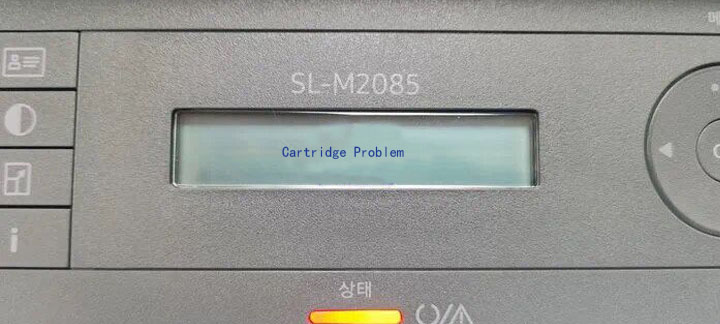
Actualizăm cipul. It has been proved that the upgraded chip can be used generally in the upgraded HP W1110A &; seria K200.
Upgrade-urile firmware-ului imprimantei pot fi enervante. Este posibil să fiți copleșit când imprimanta pare să nu imprime corect. Deci, cum păstrați imprimanta de upgrade-uri automate de firmware?
Trei pași pentru a dezactiva actualizările automate ale firmware-ului imprimantei HP
Imprimantele HP și Canon au fost modernizate pentru o serie de cipuri de imprimantă. Suppose users receive the “;automatic installation of printer updates”; mesaj. Vă rugăm să nu actualizați operațiunile. Altfel, va afecta identificarea utilizării consumabilelor de imprimare compatibile curente. Următorii trei pași vor dezactiva actualizările automate ale firmware-ului imprimantei HP.
Opriți prin Setări software HP Smart
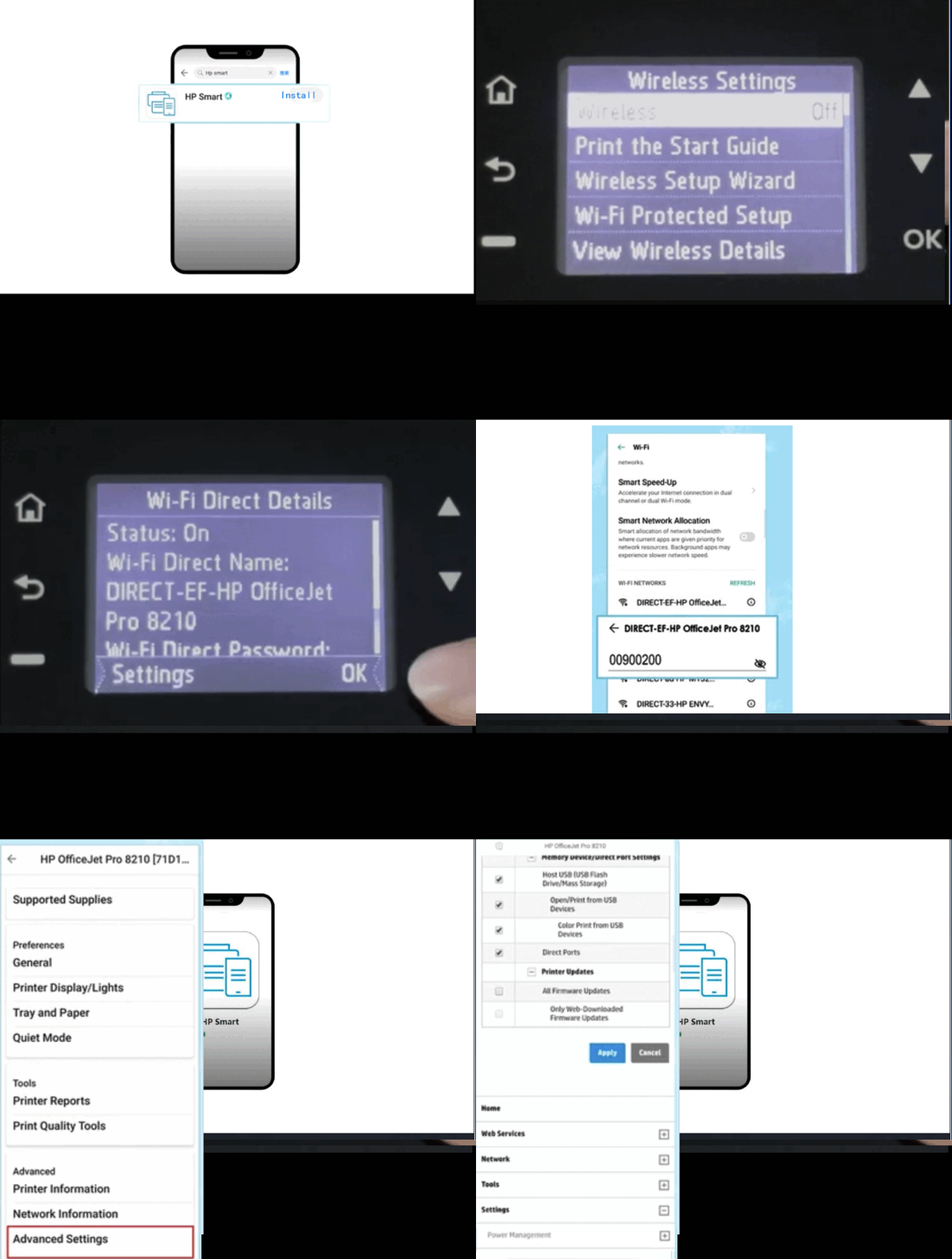
1.Descărcați aplicația HP Smart.
2.Deschideți rețeaua wireless a imprimantei → faceți clic pe Wi-Fi Direct.
3.Confirmați numele și parola rețelei fără fir imprimantei → Conectați imprimanta.
4.Deschideți aplicația HP Smart.
5.Click on the printer “;ink level icon”; pentru a intra în meniul principal.
6.Click on “;Advanced Settings”; → “;Security”; → select “;Administrator Settings.”;
7.Slide the page to the bottom → find “;Printer Update.”;
8.Uncheck the box → click “;Apply.”;
Dezactivați prin setarea adresei IP
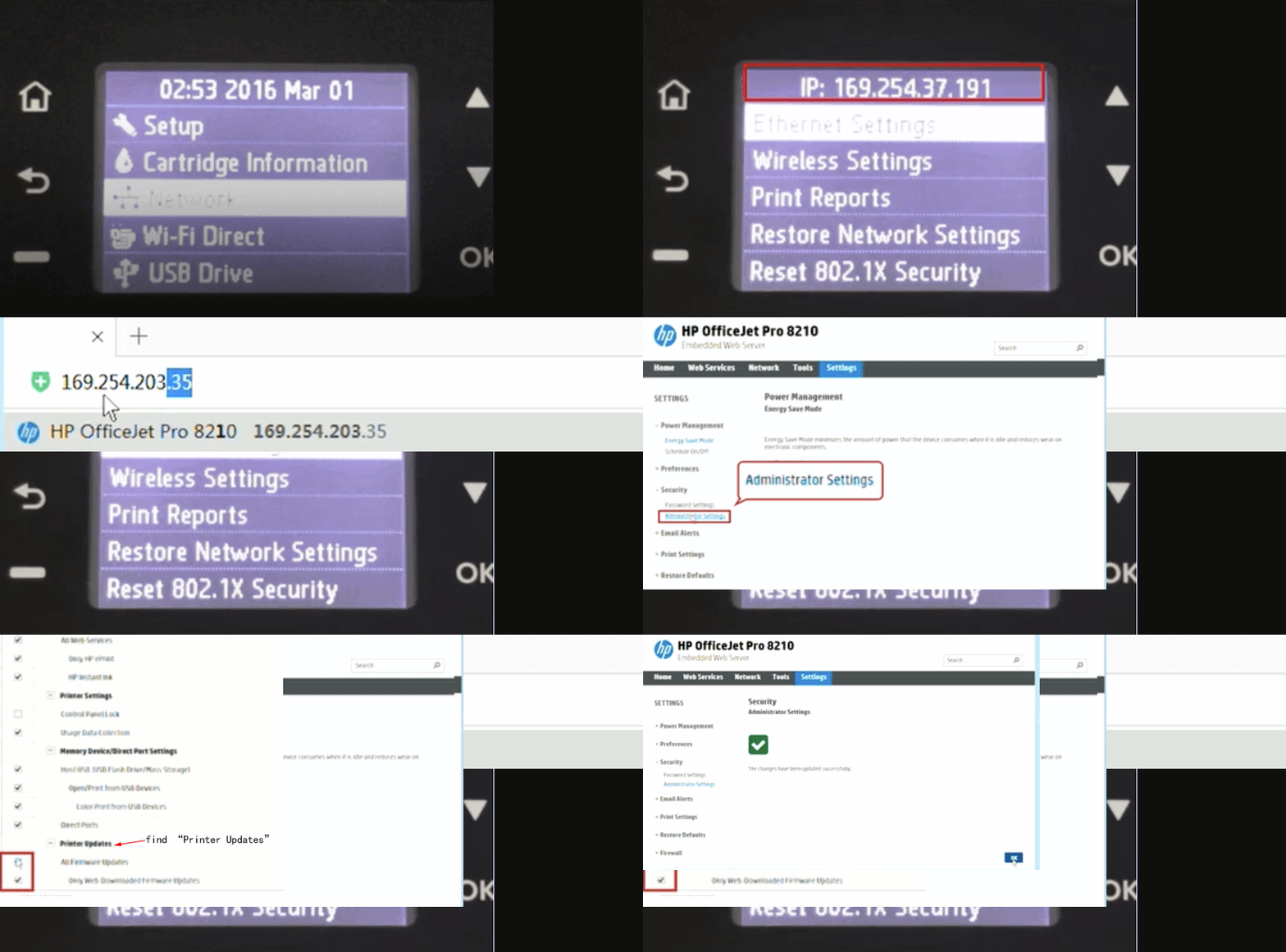
1. Select “;Network”; pe panoul de operare al imprimantei.
2. Adresa IP este afișată în partea de sus a paginii.
3.3 Introduceți adresa IP a imprimantei în bara de adrese a browserului.
4. Enter the page and click “;Settings.”;
5. Click “;Advanced Settings”; “;Security”; and select “;Administrator Settings.”;
6. Slide the page to the bottom to find the “;printer update.”;
7. Uncheck “;Apply.”;
Intrați în modul de inginerie al imprimantei pentru a se închide direct
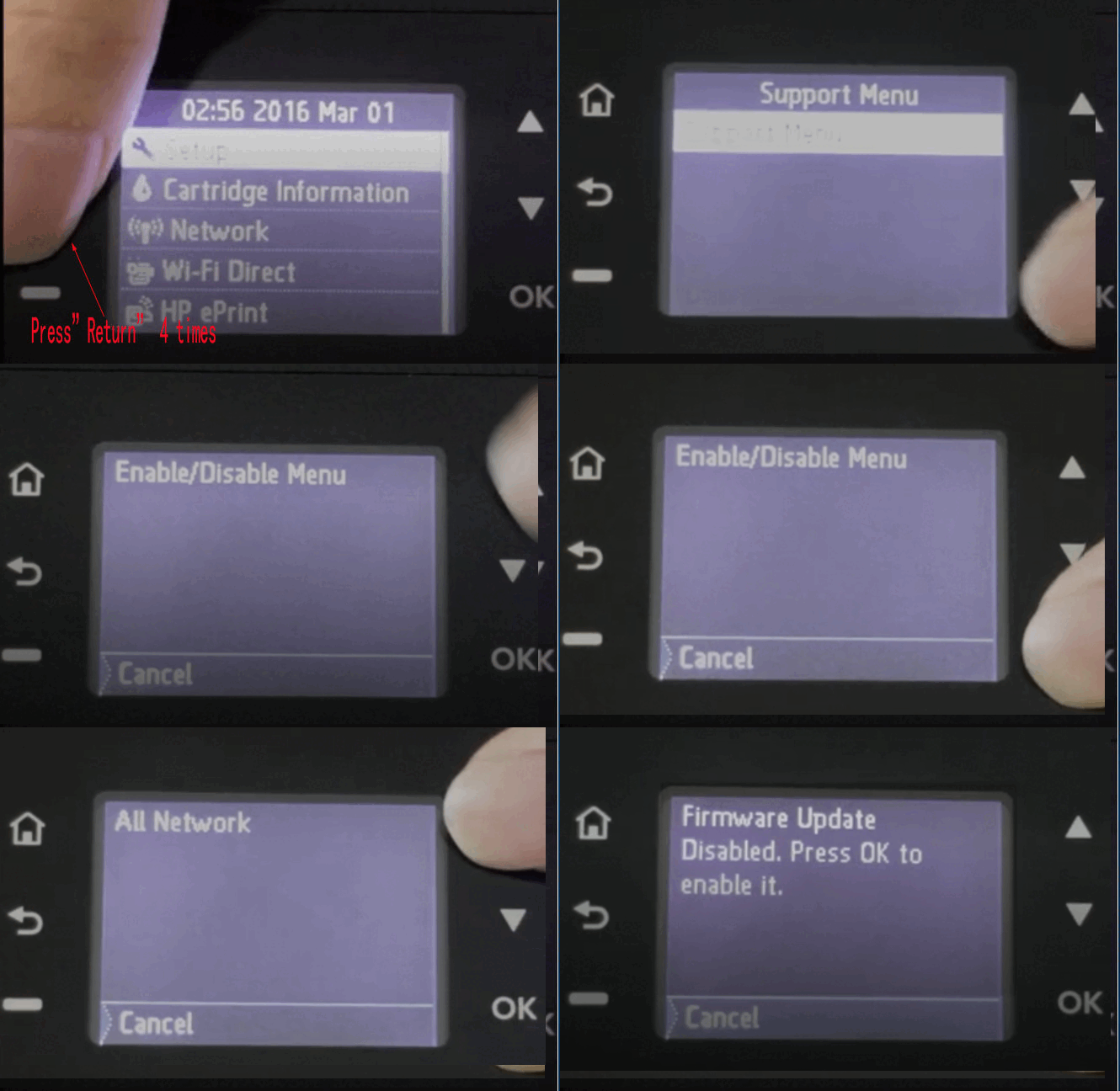
Click “;Back”; De 4 ori la rând în panoul de operare al imprimantei.
2.Go to “;Support Menu”;.
3.Click “;OK”; to enter “;Support.”;
4.Ecranul afișează versiunea curentă a firmware-ului imprimantei.
5.Find the “;Power on/off”; meniu.
6.Find “;Firmware Update”; prin apăsarea butonului sus/jos.
7.Click the “;OK”; butonul pentru a intra.
8.Press OK to enable it.”;